Block Variations
Unique, non-duplicate content blocks at scale.
What Block Variations solves
When you build location pages from a single template, every page starts out with the exact same body copy. One template becomes a page for each neighborhood, city, or state, and all of those sister pages ship word-for-word identical text. Search engines see that as duplicate content, and it is one of the fastest ways to hold back a large set of local pages.
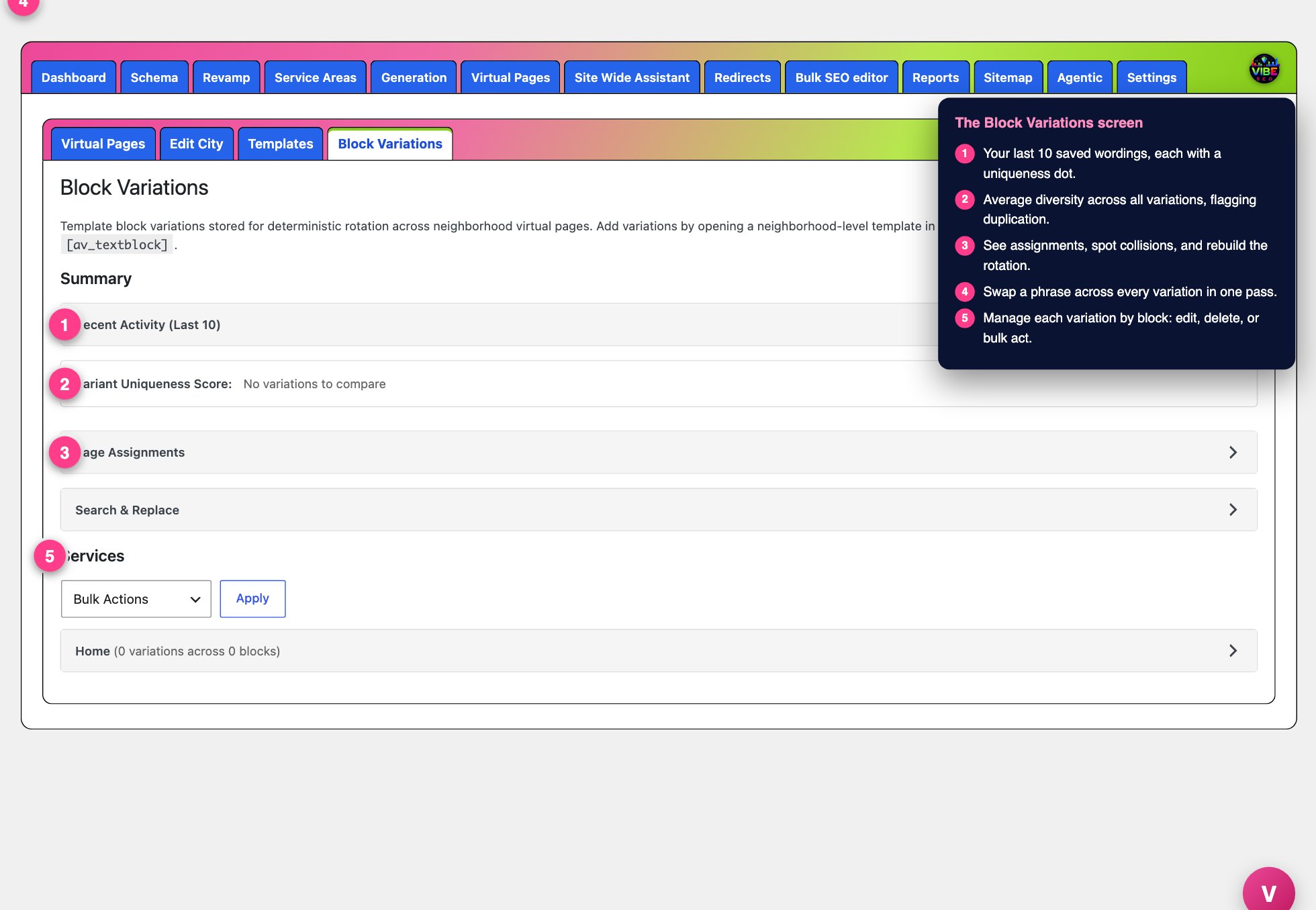 The block variations screen, with the numbered steps from this lesson marked.
Block Variations fixes this at the paragraph level. You write several wordings of the same text block once, and Vibe rotates those wordings across your sister pages so each page reads differently while staying on message. No page is left blank, nothing is written from scratch per city, and the rotation is automatic.
What it actually does
The tool works directly inside the Enfold (Avia) page builder. On any text block that contains real copy (20 characters or more), Vibe adds a small B# label showing that block's position number, for example B1, B2, B3. That number is how the tool matches the same block across every sister page.
When the page is tagged as a Virtual Pages template (or a Generation template) with a service assigned, a save button also appears on each qualifying text block:
- The VP button (the pink Vibe logo pin) saves the block's current wording into the Virtual Pages variation pool.
- The GEN button (green) saves into the Generation pool.
- If the page is tagged for both tools, both buttons appear so you choose exactly where each wording goes.
Each click captures that block's text as a new numbered variation (version 1, version 2, and so on). A badge on the button and a count next to the B# label show how many variations that block now has. Every save automatically rebuilds the page assignments, so the rotation updates the moment you save.
How pages get their wording
Vibe assigns variations deterministically, not randomly. It seeds a starting pick from each page's neighborhood and city, then runs a second collision-shift pass that rotates picks to spread wordings as widely as possible across your pages. The same page always renders the same copy on every visit, and the more variations you add per block, the more unique combinations become possible. At render time Vibe keeps the block's original styling wrapper and swaps only the words inside it.
How to use it, step by step
- Open a location template in the Enfold editor. Make sure it is tagged with a level and a service through the Virtual Pages (or Generation) settings, otherwise the save buttons stay hidden.
- Find a text block you want to vary. Note its B# number.
- Edit the wording to an alternative version, then click the VP (or GEN) button to save it. Repeat with two, three, or more distinct wordings for that same block.
- Move to the next block and do the same. The blocks you leave alone stay identical everywhere, which is fine for anything that should not change.
- Open the Block Variations admin screen (under Virtual Pages, with a matching screen under Generation) to manage everything.
On the admin screen
- Recent Activity lists your last 10 saved variations with a uniqueness dot: green means unique, amber means similar (65 to 80 percent), red means near-duplicate (80 percent or more).
- Variant Uniqueness Score gives an average across all variations, flagged as good diversity, moderate similarity, or high duplication.
- Page Assignments shows how many assignments exist across how many neighborhoods, reports any collisions (pages forced to share the same combination), and lets you Rebuild Assignments for all services or one. A "Highest Impact" list points to the blocks with the fewest variations, which are your biggest bottleneck for uniqueness.
- Search and Replace finds a phrase across every variation and swaps it in one pass. It only touches readable text, never your shortcodes or HTML tags.
- The Services section lists every variation by block, with an inline Pages dropdown that shows which live pages use each one, plus Edit, Delete, delete-by-block, delete-by-service, and bulk delete. The Edit modal highlights shortcodes and tags so you change only the words.
Why it helps
Duplicate body copy across dozens or hundreds of local pages dilutes their ranking potential. Rotating real, human wordings makes each page genuinely distinct, which supports indexing and rankings for every location instead of just a lucky few. Because it is per block, you control exactly how much variety each page gets.
The efficient way to work it
- Vary the blocks that carry the most descriptive copy first. Skip contact details, calls to action, and anything that must stay consistent.
- Chase green dots. When the uniqueness score is low or a block shows amber or red, add another genuinely different wording rather than a light reword.
- Let the "Highest Impact" list set your priorities. It tells you exactly which block will move the needle most.
- Aim for enough variations per block that the number of possible combinations comfortably exceeds your page count, which is what lets the collision-shift pass give every page a unique mix.
- Pairs naturally with Virtual Pages and Generation, which build the sister pages, and with Search and Replace here for fixing a phrase everywhere at once.