Internal Links
Spread authority to the pages you most want ranked.
What the Internal Links tool is for
Internal links are the links that point from one page on your site to another page on the same site. They matter more than most people think. Google uses them to discover your pages, to understand how they relate, and to decide which ones are important. A page that no other page links to is called an orphan, and search engines struggle to find and rank it. A page that links to nothing is a dead end that passes no value along.
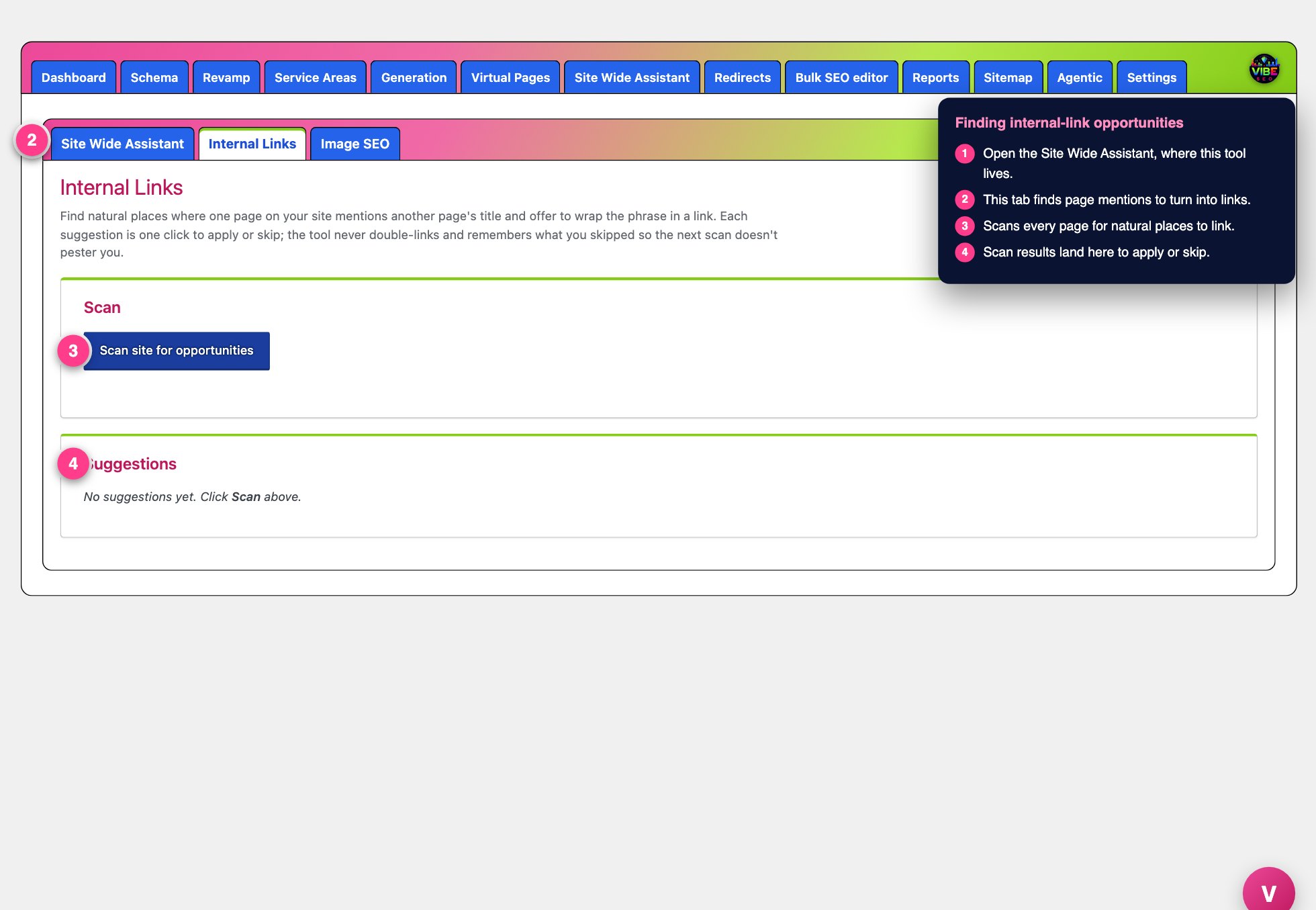 The internal links screen, with the numbered steps from this lesson marked.
The problem is that keeping internal links healthy by hand is tedious. You would have to remember every page you have, notice when one page mentions another, and add the link before you forget. On a site with dozens or hundreds of pages, nobody does this reliably. The Internal Links tool does the noticing for you and turns each opportunity into a one click decision.
What it actually does
The tool has two parts that work together.
The first part is a scanner. It reads every published page and post on your site and looks for places where the text of one page mentions the exact title of another page. When it finds a mention that is not already a link, it records that as a suggestion. For example, if your "Roof Repair" page contains the words "storm damage restoration" and you also have a page titled "Storm Damage Restoration," the tool suggests linking those words to that page. The matched title becomes the clickable anchor text, which is exactly the descriptive, relevant wording search engines reward.
The second part lives on your WordPress Pages list. The tool adds two columns next to the Vibe SEO Score column: "Links in" and "Links out." Links in counts how many other pages link to that page. Links out counts how many pages that page links to. Each number is a colored pill. Green means three or more, orange means one or two, and red means zero. A red "Links in" pill is an orphan page, and a red "Links out" pill is a dead end. These are the pages to fix first, and now you can spot them at a glance.
How to use it, step by step
- Open the Vibe SEO menu in your WordPress admin and go to the Site Wide Assistant, then the Internal Links tab.
- Click Scan site for opportunities. The tool walks your published pages and posts and builds a list of suggestions. When it finishes, it shows the count and the time of the scan.
- Review the suggestions table. Each row shows the source page (where the link would be added), the exact phrase that matched, a short snippet of the surrounding text so you can see the context, and the target page the link would point to.
- Click Apply to add the link, or Skip to dismiss that suggestion.
When you click Apply, the tool wraps the first occurrence of that phrase on the source page in a link to the target page. If your site uses the Enfold theme, it also updates the underlying builder content so the link shows up on the live page, not just in the database. The row disappears from the list once applied.
Skip is permanent for that exact source, target, and phrase combination. The tool remembers it and will not raise it again on future scans, so the list stays clean and never nags you about the same thing twice.
Built in safeguards
The scanner is deliberately conservative so it does not make a mess.
- It never double links. Text that is already inside a link is ignored, and so is text inside HTML tags or image alt attributes, so you never get broken markup.
- It caps each page at five suggestions per scan, so a single long page does not flood the list.
- It only considers page titles of four characters or more, which filters out noise.
- It sorts suggestions by how long the matched title is, showing the longest and most specific matches first. Those are the most confident, most relevant links.
Why it helps and how to work efficiently
Every applied link spreads ranking value across your site, helps Google crawl deeper, and reinforces which pages belong to which topics. The anchor text is always a real page title, so the links read naturally and describe their destination accurately.
The smartest workflow is to run a scan right after you publish a batch of new pages. The scanner processes your most recently edited pages first, so fresh content gets connected to the rest of your site quickly. Between scans, use the Links in column on the Pages list to hunt for orphans. Any page sitting at a red zero needs inbound links, and a quick scan usually surfaces exactly where to add them.
This tool pairs naturally with the Vibe SEO Score. The link count colors use the same three or more, one or two, zero thresholds as the SEO traffic light, so a page reads consistently across both. Fixing red pills here is one of the fastest ways to move a weak SEO score in the right direction.