Redirect Manager
Never lose a ranking or a visitor to a broken URL.
What the Redirect Manager is for
Every time a URL on your site changes or a page goes away, the old address does not just vanish quietly. Search engines still have it indexed, other sites still link to it, and visitors still have it bookmarked. Without a redirect, all of those people land on a "404 Not Found" page, and the ranking value that old URL earned over the years leaks away. The Redirect Manager is the tool that catches those old URLs and points them at the right new page, so you keep both the visitors and the SEO equity.
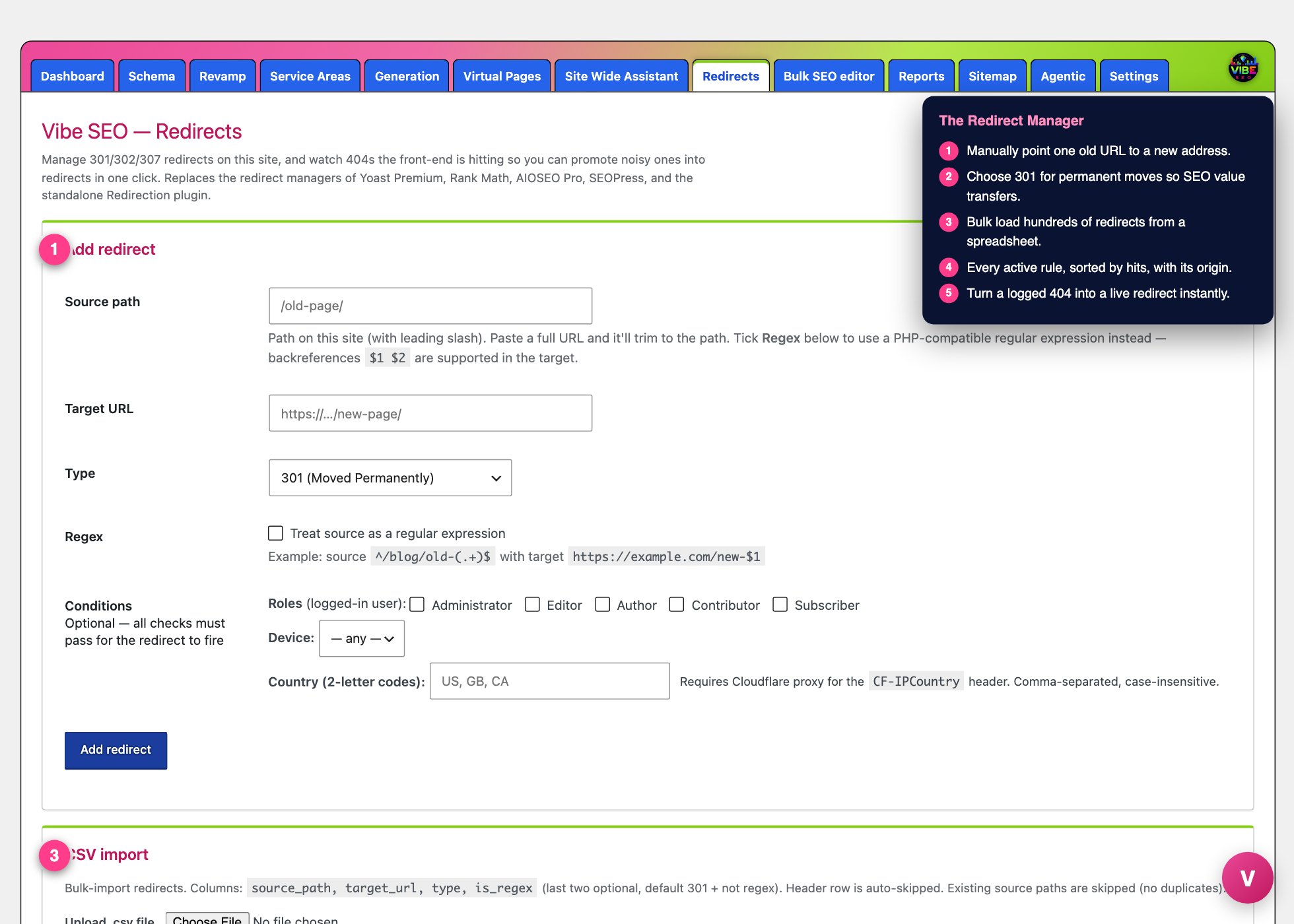 The redirects screen, with the numbered steps from this lesson marked.
It replaces the paid redirect features of Yoast Premium, Rank Math, AIOSEO Pro, SEOPress, and the standalone Redirection plugin. If you already have one of those, the Redirect Manager pulls your existing rules in automatically the first time it runs, so you are not starting from scratch.
Where it lives
In your WordPress admin sidebar, open Vibe SEO and click Redirects. The page is divided into cards: Add redirect, CSV import, Existing redirects, and the 404 log.
Creating a single redirect
The Add redirect card is the manual path. You fill in three things:
- Source path: the address on your site that should be redirected, starting with a slash, for example
/old-page/. If you paste a full URL, it trims it down to the path for you. - Target URL: where visitors should end up.
- Type: the kind of redirect. Choose 301 (Moved Permanently) when the move is permanent, which is almost always the right pick for SEO because it passes ranking value to the new page. Use 302 (Found / Temporary) or 307 (Temporary, preserve method) only when the change is genuinely short term.
There are two optional power features underneath. Tick Regex to treat the source as a pattern instead of an exact address, so one rule can catch many URLs at once. For example, source ^/blog/old-(.+)$ with target https://example.com/new-$1 moves an entire folder of posts, and the $1 carries the matched piece across. Under Conditions, you can make a redirect fire only for certain logged-in roles, only on mobile, desktop, or tablet, or only for visitors in specific countries by two-letter code. All conditions you set must pass for the redirect to fire. Country matching needs your site to be behind Cloudflare.
Bulk importing with CSV
The CSV import card handles redirects by the hundred. Upload a .csv file or paste rows directly. The columns are source_path, target_url, type, is_regex, where the last two are optional and default to a plain 301. A header row is skipped automatically, and any source path that already exists is skipped so you never create duplicates. This is the fast way to bring over a spreadsheet from a site migration.
Watching and fixing 404s
This is where the tool earns its keep over time. As real visitors hit dead URLs on your site, those addresses are collected in the 404 log, along with how many times each one was hit, when it last happened, and the referring site that sent the visitor. Common noise like favicon and sitemap requests is filtered out, so what remains is a real to-do list.
Next to each logged 404 is a Promote field. Type in the correct destination, click Promote, and that dead URL instantly becomes a live 301 redirect. The entry leaves the log and starts sending visitors to the right place. A Clear log button wipes the list when you want a fresh start.
The automatic protections
Two things happen without you touching the tool at all. First, when you change a published page's slug, its parent, or its post type, a 301 from the old address to the new one is created for you, with a built-in guard against redirect loops. Second, when you move a post or page to Trash, a small window appears first asking where that URL should redirect to, so you do not accidentally strip a ranking page off the site with nothing catching its traffic. You can still choose "Skip, just trash" if the page truly has no value.
Reading the redirect list
The Existing redirects card shows every rule, sorted by how often it has fired, with a live hit counter and last-hit timestamp for each. The Origin column tells you where a rule came from, whether you added it by hand, it was imported, it came from a slug change, or it was promoted from a 404. Anything with conditions shows a small badge. Remove a rule with the delete button on its row.
The smart workflow
Set the tool up once, let the auto-import bring your old rules over, then treat the 404 log as a weekly habit. Sort by hits, promote the noisy dead URLs to real destinations, and ignore the one-off junk. Because slug changes and trashed pages are handled automatically, most of your equity is protected before you ever open the page. Pair this with the Vibe sitemap and reporting tools so the pages you redirect toward are the ones you actually want search engines to index and rank.