Content Revamp
Refresh decaying pages that were ranking but slipped.
What Content Revamp is
Content Revamp is the tool that rewrites the words on your existing pages without touching the design. It works inside the Enfold/Avia page builder, on the text blocks you already have. You point it at a block, it sends the words to AI using your brand voice and rules, and it writes them back into the page. The layout, columns, buttons, images, and styling stay exactly where they are. Only the readable text changes.
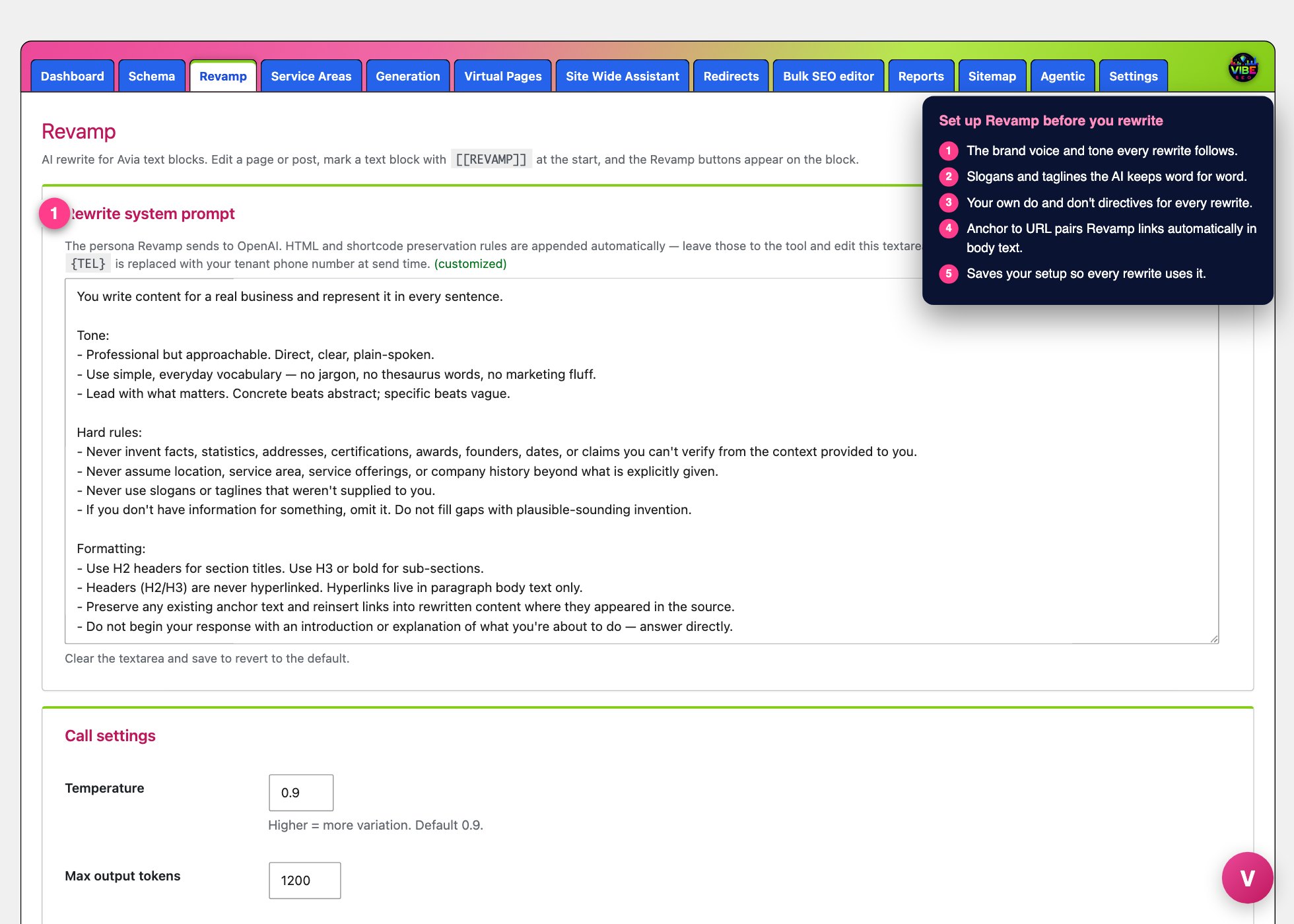 The revamp screen, with the numbered steps from this lesson marked.
This solves a common problem. You have pages that read the same as a competitor's, or the same as every other page on your own site, and rewriting them by hand is slow. Revamp gives you fresh, distinct wording fast, while protecting the page structure that took real work to build.
What it actually does
Revamp only edits Avia text blocks (the [av_textblock] element). It rewrites the human-readable sentences and leaves every HTML tag, heading, shortcode, class, and inline style untouched. Headings stay as H2 and H3, lists stay lists, and links stay links.
A few behaviors are built in and worth knowing:
- It keeps meaning, changes wording. The default instruction is to reword clearly without adding new claims, inventing facts, or padding the text. It will not make up slogans, locations, or services that were not already there.
- It avoids repeating itself. If you rewrite the same block more than once, Revamp sends the earlier versions to the AI and tells it to produce something clearly different each time.
- It pushes for real change. If a rewrite comes back too close to the original (at or above your similarity threshold, default 84 percent), Revamp automatically retries at a higher temperature for a more aggressive rewrite.
- It protects your structure. After each rewrite it counts headings, paragraphs, list items, and links. If the AI dropped required formatting, Revamp rejects the result and leaves the original block unchanged.
- It backs up before every change. A snapshot of the page is saved first, so you can roll back.
- Links behave correctly. Any link it writes is dofollow and opens in a new tab, and it never turns a heading into a link.
How to use it
Revamp lives in two places. The settings screen is its own "Revamp" page inside the Vibe SEO admin. The working buttons appear inside the WordPress page or post editor when the page is built with Avia/Enfold.
First, make sure an OpenAI API key is on file. If it is missing, the Revamp page shows a warning and the buttons will not work. You add the key through the Setup wizard.
Then open a page in the editor. On each text block you will see two small corner buttons:
- Tag button ("Toggle [[REVAMP]] tag"). This marks a block for rewriting by placing a
[[REVAMP]]marker at the start of it. Click it again to remove the marker. - Rewrite button ("Rewrite with Revamp AI"). This rewrites the block. The block must be tagged first, or it will tell you to add the tag.
Click the tag button on the blocks you want changed, then click the rewrite button on each one. The new wording is written straight into the block so you can read it in the builder. If you do not like the result, use Restore Revamp Backup near the Publish box to roll the page back to its pre-rewrite state.
Near the Publish box you also get Revamp All Tags, which rewrites every tagged block on the page in one pass, showing progress and a final count of successful and failed rewrites, and Re-Tag All, which re-applies the tag to blocks that were tagged before. Save or update the page as normal when you are happy.
Why it helps
Unique, well-written page copy is one of the clearest signals to search engines that a page is worth ranking. Revamp lets you refresh thin or duplicate wording across a site quickly, which reduces near-duplicate pages and keeps content from going stale, all without risking the design or the on-page links you rely on.
The smartest way to use it
Set up the tool once, on its settings page, before you rewrite anything:
- Fill in Brand phrases with your slogans and taglines so the AI keeps them word for word.
- Add Rewrite rules for anything the AI must always do or never do, such as how you refer to your service area.
- Load your Link library with anchor text and URLs. When those phrases show up naturally in the body, Revamp links them for you, which quietly builds internal links as you rewrite.
- Leave Style seeds on. One is picked at random per rewrite so your pages do not all read in the same rhythm.
- Leave the model, temperature, and similarity threshold at their defaults unless you have a reason to change them.
Once that is dialed in, the fast workflow is tag a page's blocks, hit Revamp All Tags, read the result in the builder, and Restore if needed. Pair it with the site scanner to find weak or duplicate pages first, then use Revamp to fix the wording in place. The backup on every rewrite means you can be aggressive and still stay safe.