Vibe Agentic: The AI Agent Team
Put the entire process on autopilot, with guardrails.
What this tool is
Agentic is your autonomous SEO team. Instead of you opening the plugin and running each tool by hand, a crew of specialist agents works on your site continuously in the background. They scan for issues and fix your content, they write and improve pages, they keep your Google listing active, and they report back on everything they did. The whole point is that the work keeps happening whether or not you log in.
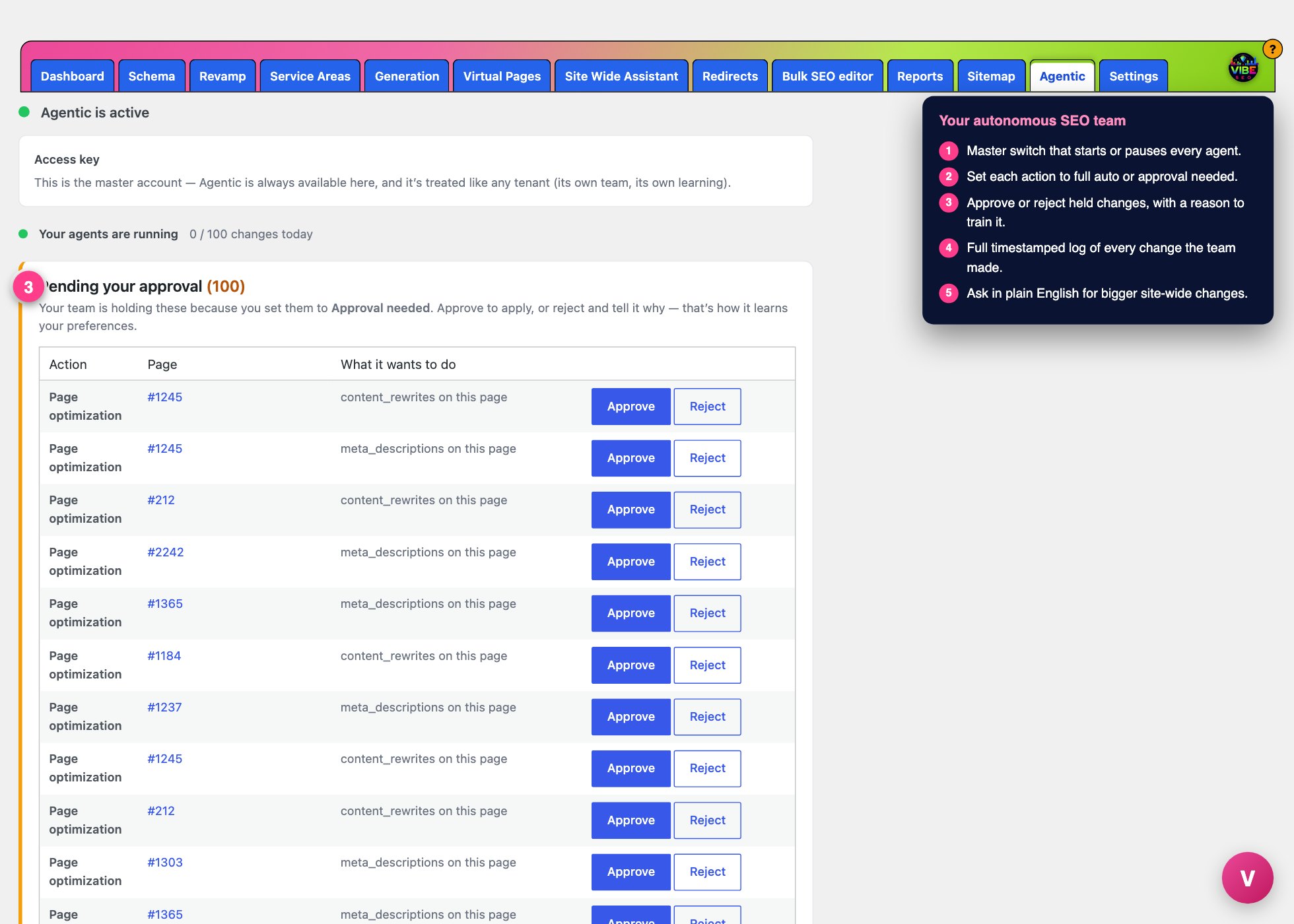 The agentic screen, with the numbered steps from this lesson marked.
Two rules sit underneath all of it. First, the agents never touch your design or theme. They change words, meta descriptions, headings, links, and schema, but the layout and look of your site stay exactly as they are. Second, nothing happens outside the limits you set. You decide what the team may do on its own and what it has to run past you first.
Turning it on
Agentic is a paid add-on to your Vibe SEO subscription, so the page starts with an Access key box. Paste the key tied to the Agentic product shown in your account and click Save key. The page confirms with either "Agentic add-on active on this key" or a note that the key does not include the add-on. A status dot at the top reads "Agentic is active" once you are set.
Below that is the master switch: Turn the SEO team on. When it is on, the team scans your site and does its work. Uncheck it and every agent stops instantly. There is also a small live counter showing how many changes have been made today against your daily limit.
Deciding what runs on its own
The most important setting is the table titled What the team may do on its own. Every kind of action the team can take is listed separately, and for each one you choose Full auto (applied the moment it is made) or Approval needed (held for you to approve or reject). The actions are:
- Meta descriptions and title tags
- Content rewrites and heading structure
- Internal links between your pages
- Schema markup
- Blog posts and new service-area pages
- Google Business posts and Google review replies
- Outreach drafts
New teams default to Approval needed on everything, and that is deliberate. The recommendation on the page is to leave it there for two to three weeks. During that window the team still does all its work, but nothing goes live until you sign off, so you can see the kind of changes being made and the team learns your style before it runs on its own.
You also set a Daily change limit here (the default is 30). This is a hard ceiling on how many changes ship in a day, which keeps the pace steady and prevents any surprise flood of edits.
Approving, rejecting, and training the team
When actions are held for you, a Pending your approval panel appears near the top. Each row shows the action, the page it affects, and what the team wants to do. Click Approve to apply it, or Reject and type a short reason. That reason matters: it is how the team learns your preferences, so a rejected change with an explanation makes the next batch better. This is the fastest way to shape the team toward the results you want.
Seeing what happened
The page gives you several windows into the work:
- Today's report is a summary card with a headline, counts of pages optimized, published, and in progress, and a before-to-after score for each page it touched. Older reports collapse below it.
- Pages and posts your team created lists every new page and blog article with view and edit links. New creations land as drafts held for review, so you get a look before they go public.
- What your agents did is the full running activity log, timestamped, so nothing is hidden.
Every change is reversible. The team snapshots a page before editing it, verifies the result, and rolls back automatically if anything regressed. Your pricing and your legal pages are permanently off-limits and the agents will never edit them.
The Agentic Feed
At the bottom is a chat box called the Agentic Feed. This is where you ask for anything bigger than routine SEO. A phone number that changed and needs updating everywhere, a request for new pages covering more of your service area, and similar site-wide requests all go here in plain English. Type it, and the team confirms a plan with you before it touches anything. If the agents are between runs when you send a message, it is saved and picked up on the next pass.
Getting the most from it
- Leave everything on Approval needed at first and use the reject-with-a-reason box actively. A few weeks of feedback trains the team far better than tweaking settings.
- Once you trust the output, move low-risk, high-frequency work like meta descriptions and internal links to Full auto, and keep approval on new pages and anything customer-facing.
- Connect Google Business Profile and Search Console first. The agents use that data to reply to reviews, post updates, and target real search demand rather than guessing.
- Use the Feed for the one-off big asks and let the daily autopilot handle the steady grind. That split is where Agentic earns its keep.