The Site Scanner
Six scans that surface everything holding the site back.
What the Site Scanner is
The Site Scanner is a full-site audit suite built into the Site Wide Assistant tool. Instead of opening pages one at a time to hunt for problems, you run a scan and the plugin reads every published page and post at once, then hands you a categorized list of what needs attention. It reads both normal WordPress content and Enfold builder data, so it sees the text visitors actually see.
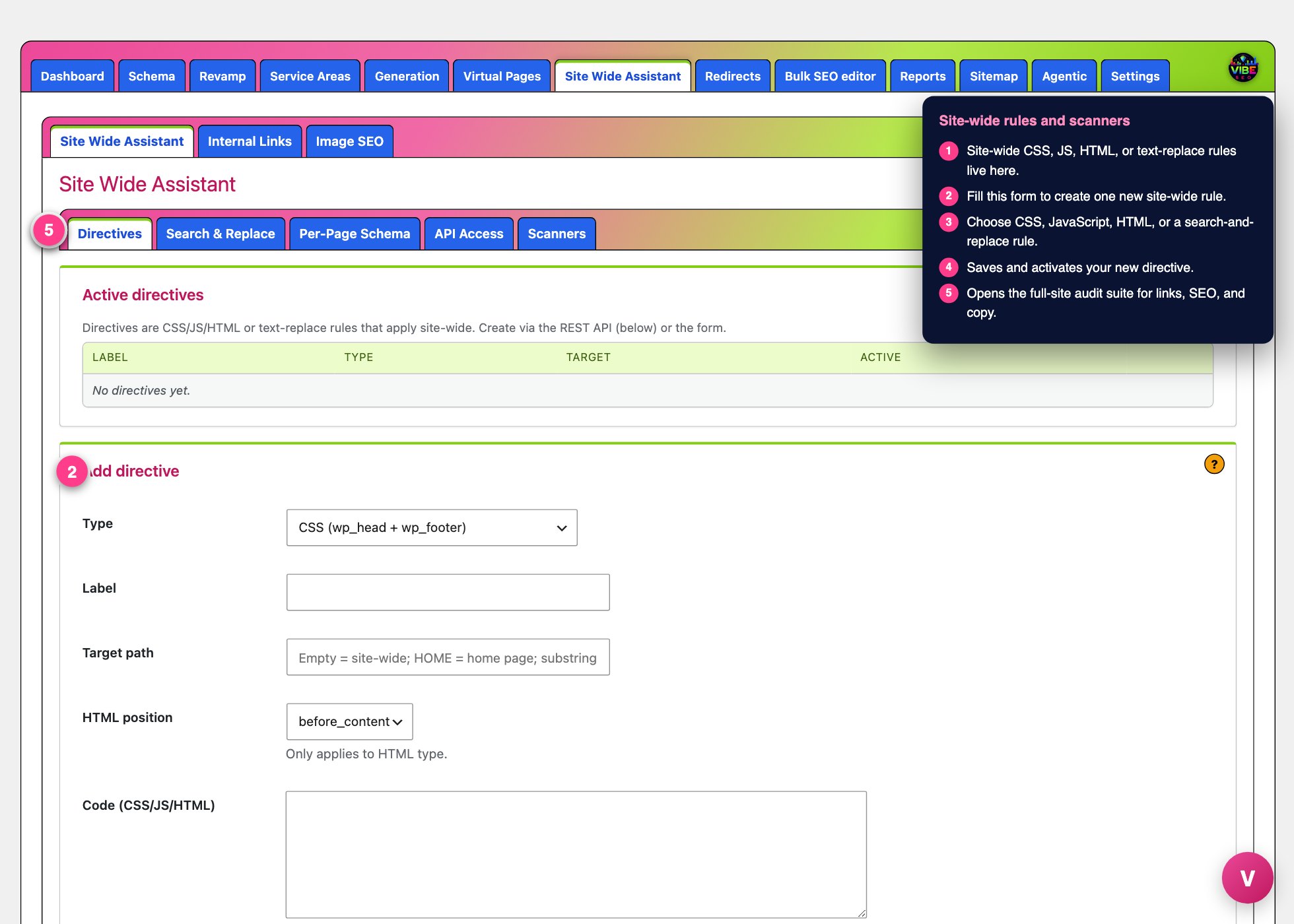 The sitewide screen, with the numbered steps from this lesson marked.
It is really six scanners in one, each aimed at a different class of problem: broken links, AI-sounding copy, grammar mistakes, on-page SEO gaps, Google ranking signals, and duplicate content. Several of them do not just flag issues, they fix them with one click and keep an undo snapshot.
Where it lives and how to run a scan
Open the Vibe SEO menu in your WordPress admin, go to Site Wide Assistant, then click the Scanners tab. A second row of sub-tabs appears: Link, AI, Grammar, SEO, Google Signal, and Duplicate. Each has its own "? How to use" button that explains that specific audit.
The pattern is the same everywhere. Most scanners let you choose a scope (Pages and Posts, Pages only, or Posts only), then you press Scan Now and watch a progress bar as the site is worked through in batches. Results land in collapsible cards, and most scanners give you a Focused folder and a Disregarded folder so you can set items aside without losing them.
The six scanners
Link Scanner
Runs in two phases. First it extracts every link, then it checks each URL. Results are grouped into Broken Links, Nofollow Links, Same-Tab Links, HTTP Links (insecure), and Missing Anchor Text. A separate "Couldn't Auto-Verify" group holds links from sites that block automated checkers (they answered with a 403 or 429), so a working link to a place like the BBB is never wrongly called broken. You can fix links right from the table: Unlink, make a nofollow link Dofollow, force a same-tab link to open in a new tab, upgrade HTTP to HTTPS, or edit the URL and anchor text. Batch buttons apply a fix to every selected row, and Recheck confirms the change actually stuck.
AI Scanner
Scores each page for signs of AI-generated or pasted content. Signals include chat UI wrappers pasted from ChatGPT or Claude (100 points each), overused AI vocabulary like delve, seamless, leverage, and tapestry (2 points per hit), em dashes (2 points each), and heavy bullet-list density. Two one-click fixes are built in: Strip Wrappers removes the leftover chat markup while preserving your visual formatting, and Fix Em Dashes rewrites em dashes into commas, colons, or clean sentence splits. Both show a before-and-after preview and save an undo snapshot in a Recent Operations panel.
Grammar
A regex-based check for mechanical mistakes: double spaces, repeated words, missing space after punctuation, double punctuation, a lowercase standalone "i", overly long run-on sentences, and shouting ALL CAPS words. It flags only, with a snippet of context for each hit, and never auto-edits. You can maintain an ALL-CAPS whitelist so acronyms and brand names like USA, SEO, or API are not flagged.
SEO Scanner
An on-page audit covering thin content (below a word count you set, default 300), duplicate titles, missing meta descriptions (it reads Yoast, All in One SEO, and Rank Math), heading problems (missing H1, multiple H1s, empty headings), orphan pages with no internal links pointing to them, and near-duplicate pages that may be competing with each other. You can fix issues inline: write and save a meta description, change a heading tag, or delete a stray heading, each with undo. Thin pages that already have a redirect are set aside automatically.
Google Signal
Focuses on the signals that actually affect indexing and ranking: noindex pages hidden from Google, canonical URLs pointing to the wrong place, title and H1 topics that diverge, pages with too few outbound internal links, pages with too few inbound links, and images missing alt text. Thresholds for links and title similarity are adjustable. Items carry impact badges from Critical down to Medium so you know what to clear first.
Duplicate Search
Search any word, phrase, or full block of text across the whole site and jump straight to the matching edit screens. Matches are ranked by similarity against a threshold you control. An omit list lets you tell the scanner to ignore blocks that are supposed to repeat everywhere, like a footer call to action or an FAQ, matched by content fingerprint rather than position. On any post or page edit screen you also get a Duplicate Content Scanner box that scans that page's own blocks against the rest of the site.
Why it helps
Broken links and missing alt text quietly drain trust and rankings. Duplicate titles and near-identical pages make your own pages compete with each other. Thin content and noindex tags keep pages out of Google entirely. The Site Scanner surfaces all of this at once and, where it is safe, fixes it in place, turning a week of manual auditing into an afternoon.
The most efficient way to use it
Work the scanners in order of leverage. Start with Google Signal to catch anything blocking pages from Google, then SEO for structural gaps, then Link to clean up dead and insecure links in bulk. Run AI and Grammar when you are polishing copy, and use Duplicate Search when you suspect cannibalization. Send false positives to the Disregarded folder so each rescan shows only real work, and build up your ALL-CAPS and omit lists early so the noise drops over time. For the deeper rewrites the AI and Duplicate scanners point you toward, hand the weak pages to Revamp rather than editing by hand.