Content Briefs
Turn a target keyword into a ready-to-write outline.
What Content Briefs is for
Writing a page that ranks is not really a writing problem, it is a planning problem. Before you type a word you need to know what the searcher actually wants, which headings to use, which topics and entities Google expects to see, what questions to answer, and which of your own pages to link to. Most people skip that planning and produce thin content that never ranks.
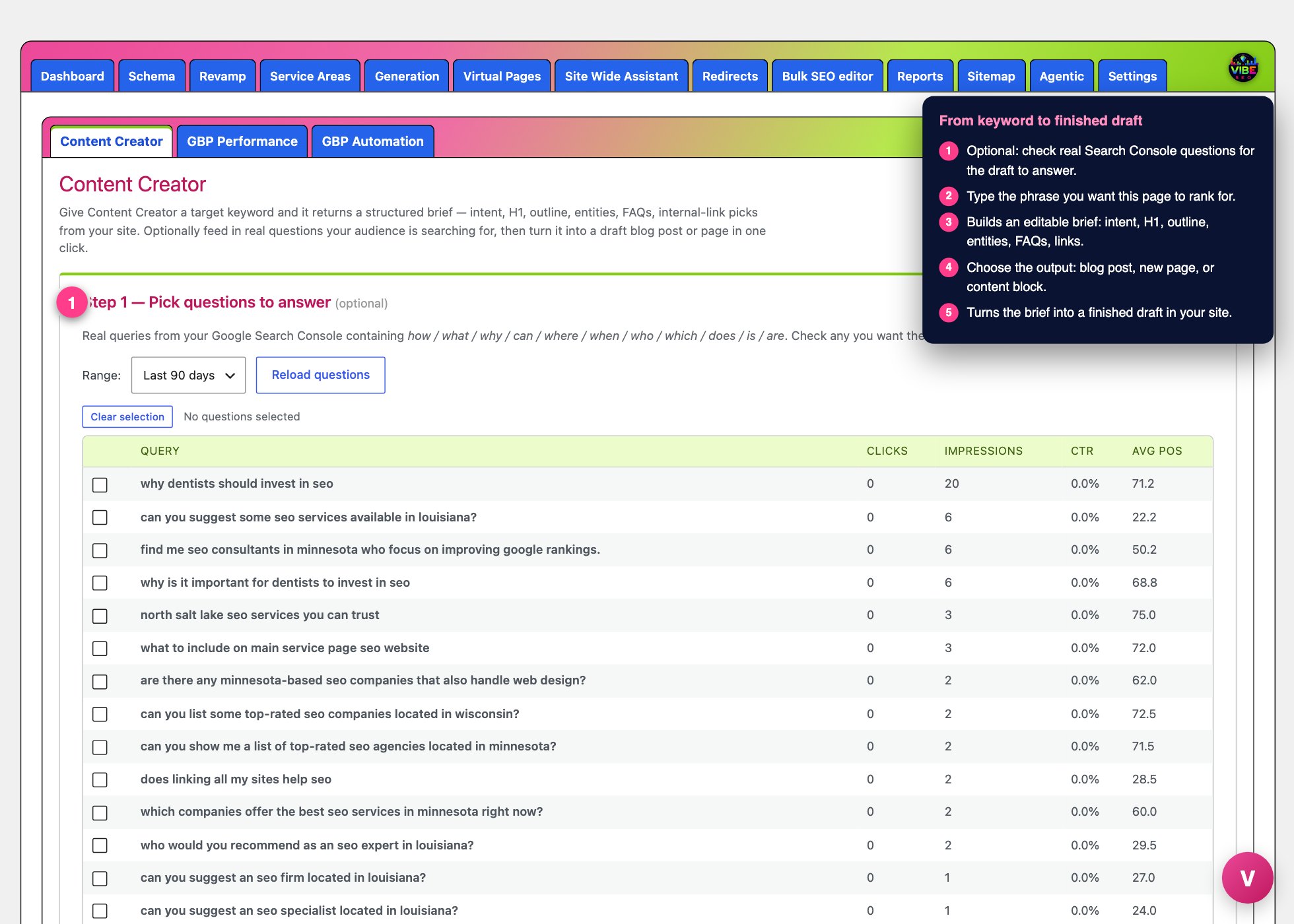 The brief screen, with the numbered steps from this lesson marked.
Content Briefs solves that. In the plugin it appears as the Content Creator tool. You give it a target keyword and it builds a structured brief for you, then turns that brief into a finished draft in your site with one more click. It grounds everything in your own business details and your own published pages, so the output is specific to your site rather than generic.
What it actually does
The tool runs a two-call AI workflow. The first call produces the brief, the second writes the content. It reads your business context from Site Settings (business name, summary, services, and service areas) so the brief fits what you actually do. For internal links it looks at your 60 most recently updated published pages and posts and offers them as link candidates, and the AI is only allowed to pick from that real list, so you never get invented URLs.
The generated brief is a structured object you can see and edit. It includes:
- Intent, labeled as informational, commercial, transactional, or navigational.
- H1, the recommended page headline.
- Outline, your H2 sections each with supporting bullet points.
- Target word count.
- Entities, the topics and named things the page should cover.
- FAQs, question and answer pairs.
- Internal links, picked from your own pages with suggested anchor text.
How to use it, step by step
You will find Content Creator on its own admin page and also as a tab on the Vibe Dashboard. The two are the same form.
Step 1, pick questions to answer (optional)
If Google Search Console is connected, this block pulls the real question-style queries your site already shows up for, the ones containing words like how, what, why, can, where, when, who, which, does, is, and are. It intelligently hides questions you already answer well and shows the genuine gaps, along with clicks, impressions, CTR, and average position for each. Choose a range of 28, 90, 180, or 365 days, then check any questions you want the draft to answer directly. Checked questions are fed into the brief and the AI must answer each one, word for word, as an FAQ. If GSC is not connected you can skip this step and the AI will write FAQs from scratch.
Step 2, generate the brief
Enter your Target keyword, for example "metal roof replacement Fort Worth". Optionally add an Angle or audience, such as "for homeowners after a hailstorm". Click Generate brief. The brief appears in an editable text box. Read it and change anything you like before moving on, since your edits carry through to the draft.
Step 3, create the draft
This step unlocks once a brief exists. Pick a content type:
- Blog Post, creates a new draft post following the brief.
- New Page, creates a new draft page. You can optionally choose a Generation template to mimic, which copies that template's SEO meta and featured image onto your new page while replacing its layout with the AI written content.
- Content Block, creates no post at all. The AI returns ready to paste HTML that starts with an H2 so it drops neatly under an existing page's H1. You get a live preview and a Copy HTML button.
Click Generate draft post (or Generate HTML block). Writing takes about 30 to 60 seconds. For posts and pages you get an Open in editor link so you can polish and publish. The full brief is saved with the post so you always have a record of the plan behind it.
Why it helps
You get a page built the way search engines reward: correct intent, a clean heading structure, the entities competitors cover, answers to the exact questions your audience types, and internal links that pass authority between your real pages. That is the difference between content that sits on page five and content that earns rankings.
The smartest way to use it
- Connect GSC first. Feeding in real audience questions is the single biggest quality boost, because you are answering demand you can measure rather than guessing.
- Edit the brief before drafting. Trim weak sections, tighten the H1, and confirm the internal link picks. Two minutes here saves ten in the editor.
- Use Content Block for pages you already have, so you can enrich an existing top page instead of splitting its authority with a new one.
- Pair New Page with a Generation template when you want on brand pages fast, then re-flow sections in the editor if you want to keep the template's original design.
- Everything lands as a draft, never live, so you always review before publishing.