XML Sitemap
One authoritative sitemap Google rechecks on every change.
What the Sitemap tool is
An XML sitemap is a machine-readable list of every page on your site that you want search engines to find. Google and Bing read it and know exactly what exists and when it last changed, instead of hoping their crawlers stumble onto each URL through links.
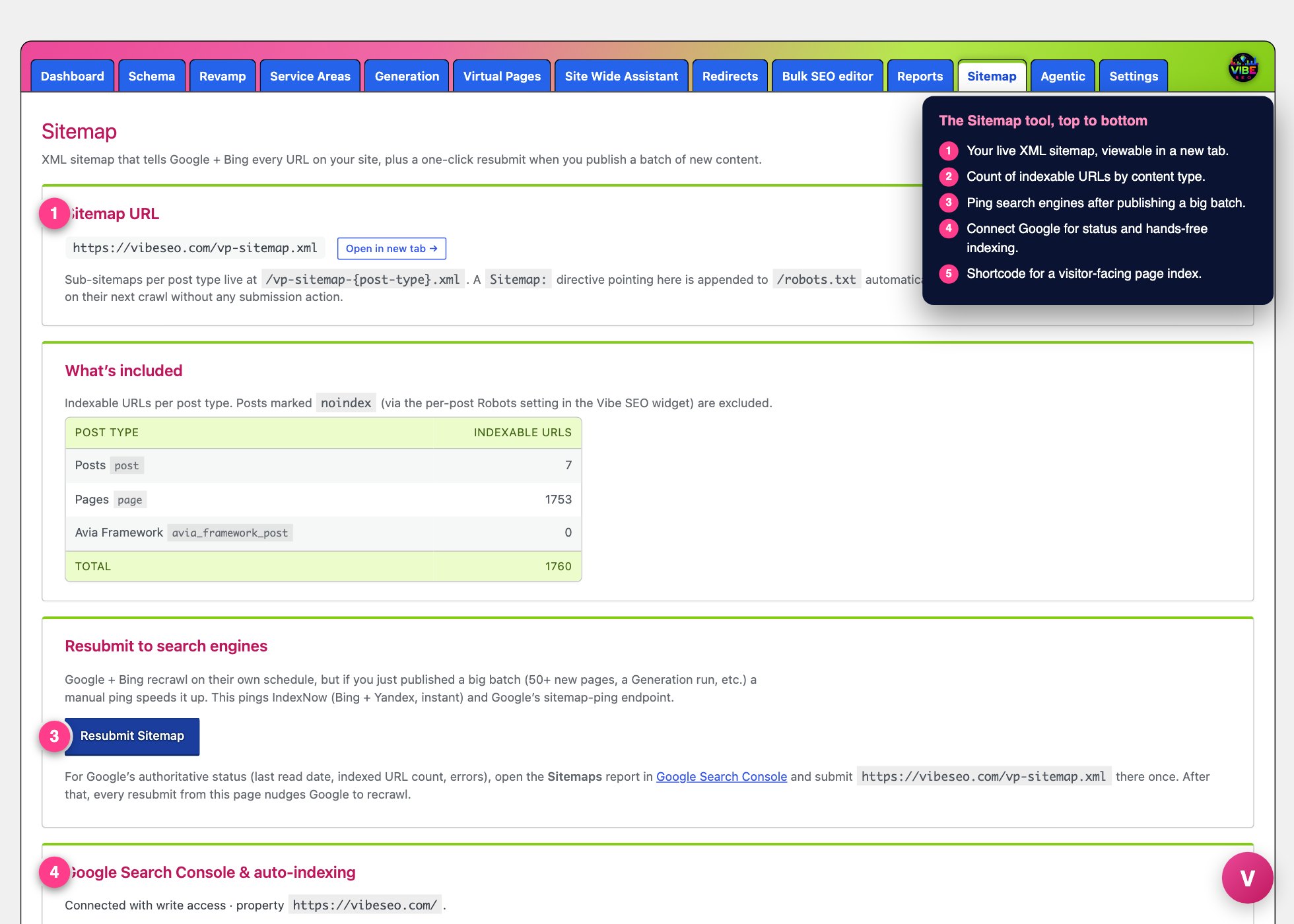 The sitemap screen, with the numbered steps from this lesson marked.
The Sitemap tool is your one place to run all of that. It lives under the Vibe SEO menu in your WordPress admin, on the tab labeled Sitemap. From there you can see your sitemap's status, view it, control which pages are included, resubmit it to search engines, and connect Google for hands-free indexing.
What it actually does
Vibe builds and serves your sitemap at /vp-sitemap.xml. That top file is an index that points to a separate sub-sitemap for each content type, at /vp-sitemap-{post-type}.xml (your pages, your posts, your products). Splitting it this way keeps each file small and fast even on a large site.
A few things happen automatically once the sitemap is live:
- Every published, indexable URL is listed, grouped by content type, with a last-modified date so search engines know what to recrawl first.
- Featured images (and the first inline image if there is no featured one) are included, which helps your pictures surface in image search.
- A
Sitemap:line is added to yourrobots.txtautomatically, so search engines discover it on their next crawl with no action from you. - WordPress core's own
/wp-sitemap.xmlis switched off so there is one authoritative map instead of two competing ones. - If you use Vibe's virtual city pages, the reviewed and promoted ones get their own
/vp-sitemap-cities.xmlsub-sitemap.
One important gate: Vibe must be the primary SEO renderer
Vibe's sitemap stays dormant until Vibe is the primary SEO renderer for your site. This is deliberate. If you still run Yoast, Rank Math, or All in One SEO, two sitemaps would fight each other. While a competing plugin is in charge, the Sitemap page shows a warning and a button, Make Vibe the primary SEO renderer. Clicking it flips Vibe on, activates /vp-sitemap.xml, and leaves your other SEO plugin as a passive backstop. You can keep both installed.
How to use it, step by step
- Open Vibe SEO, then the Sitemap tab.
- If you see the dormant warning, click Make Vibe the primary SEO renderer. Your sitemap goes live immediately.
- In the Sitemap URL card, use Open in new tab to view the live file.
- Check the What's included card. It shows a table of indexable URLs per content type, plus a total. Anything you have marked noindex (using the per-post Robots setting in the Vibe SEO widget) is left out, and attachments are never listed.
- When you publish a large batch, such as a Generation run or fifty new pages, click Resubmit Sitemap in the Resubmit to search engines card. This pings IndexNow (Bing and Yandex, almost instant) and Google's sitemap-ping endpoint to speed up the recrawl. The button is disabled until Vibe is primary.
You usually do not need to resubmit for a single edit. When Vibe is primary it already pushes each URL to IndexNow the moment you publish or update a post, so everyday changes propagate on their own.
Connect Google for authoritative status and auto-indexing
The Google Search Console and auto-indexing card lets you go further. Click Connect Google (write access) to authorize Vibe. This requires a one-time Google Cloud setup first (enabling the Indexing API and Search Console API and adding the scopes on the OAuth app). Once connected with write access you get:
- A Submit sitemap to Google button, with a freshness indicator that tells you whether your sitemap is up to date or whether new or updated pages make a resubmit worthwhile.
- An Auto-request indexing toggle for new and re-indexable pages, with a Daily cap you can set (default 10, up to 200 pages per day). A daily job sends up to the cap and carries the rest over. The card shows how many requests went out today, how many are queued, and a log of recent requests.
For Google's own authoritative report (last read date, indexed URL count, errors), submit /vp-sitemap.xml once inside Google Search Console's Sitemaps report. After that, every resubmit here nudges a recrawl.
Why it helps
A complete, accurate sitemap gets new content found and indexed faster, which is the difference between a page you published today and a page Google actually ranks. The last-modified dates tell crawlers what changed so they spend their crawl budget where it matters, and the image entries open up image search. Because Vibe serves one authoritative sitemap and auto-lists it in robots.txt, discovery becomes a one-time setup rather than a chore.
The smartest way to use it
- Flip Vibe to primary first. Everything on this page, and the automatic IndexNow push, is gated on it.
- Submit the sitemap in Google Search Console once for real reporting, then rely on the Resubmit button after big content pushes.
- If you can do the Google Cloud setup, connect write access and turn on auto-indexing with a modest cap. It is the strongest recrawl signal Vibe can send.
- Control what appears using the per-post Robots noindex setting in the Vibe SEO widget. The sitemap mirrors it exactly, so pruning thin pages there cleans up the map too.
- Add a visitor-facing HTML sitemap with the
[vp_html_sitemap]shortcode on any page. It lists your public content grouped by type and takes optional arguments:post_types="page,post",exclude="123,456",limit="500", andorder="title|date". It works even when Vibe is not primary, so it doubles as a footer link.